

Understand survey statuses
A survey’s status tells you where it is in its lifecycle and controls which actions are available. The lifecycle is draft → running → closed → compiled, driven by the open and close dates you set; there are no pause or cancel actions.
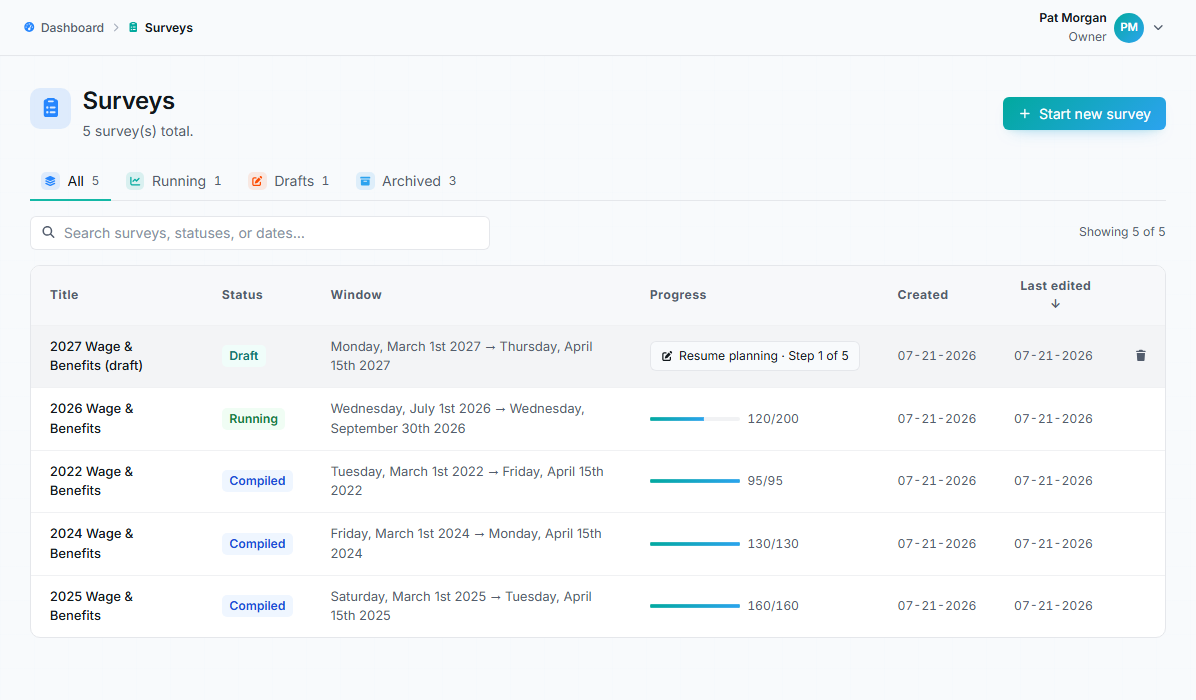
The surveys list: one place to see every survey’s status, window, and response progress.
The survey is still in the setup wizard. You can edit questions, add invitees, and change any setting, including the safe harbor threshold. Nothing is visible to takers and no email is sent. A draft stays a draft until you explicitly launch it, even if its open date has already passed.
Scheduled
Section titled “Scheduled”You launched the survey but its open date is in the future. It will begin running on the open date. Like drafts, scheduled surveys can still be edited.
Running
Section titled “Running”The survey is live within its date window. Takers receive invitations, answer, and submit. While a survey is running:
- Question edits are blocked. Structural changes would corrupt answers already collected. If you must change questions, create a new draft.
- You can extend the close date with the Extend button on the survey page; the new date must be later than the current one. Shortening the window is not possible.
- Invitee management, reminders, and reminder settings all remain available.
Focus on operations: watch response rate, follow up with not-started takers, and help in-progress takers finish. See Review survey progress.
Closed
Section titled “Closed”The close date has passed and takers can no longer submit.
Closed does not mean anyone can see results. Results remain private to owners and managers until explicitly released.
Compiled
Section titled “Compiled”Results have been processed and are ready on the results page. Owners and managers can analyze them, configure filters and visibility, preview the released view, and release access per audience. Surveys that are closed or compiled but not yet released appear on the dashboard under Recently closed / awaiting release.
Why status matters
Section titled “Why status matters”| Status | Takers can submit | Questions editable | Release controls |
|---|---|---|---|
| Draft / Scheduled | No | Yes | Locked |
| Running | Yes | No (close date can be extended) | Locked |
| Closed | No | No | Unlocked |
| Compiled | No | No | Unlocked |
Common confusion
Section titled “Common confusion”Closed vs. released
Section titled “Closed vs. released”Closed means the response window ended. Released means an owner or manager deliberately granted a specific audience access to results. A survey can stay closed-and-unreleased indefinitely.
Released vs. public
Section titled “Released vs. public”Release is per audience: viewers, takers, and subscribers are each released separately. Releasing to one audience does not make results public.
Why can’t I edit my running survey?
Section titled “Why can’t I edit my running survey?”Answers already submitted must stay consistent with the questions they answered. That is why edits lock at launch, and why the launch step asks you to confirm “Questions are ready.”