
Survey reminders
Reminders are configured per survey, because timing, audience, and urgency change from one survey to the next. Open a survey and go to its Reminders tab.
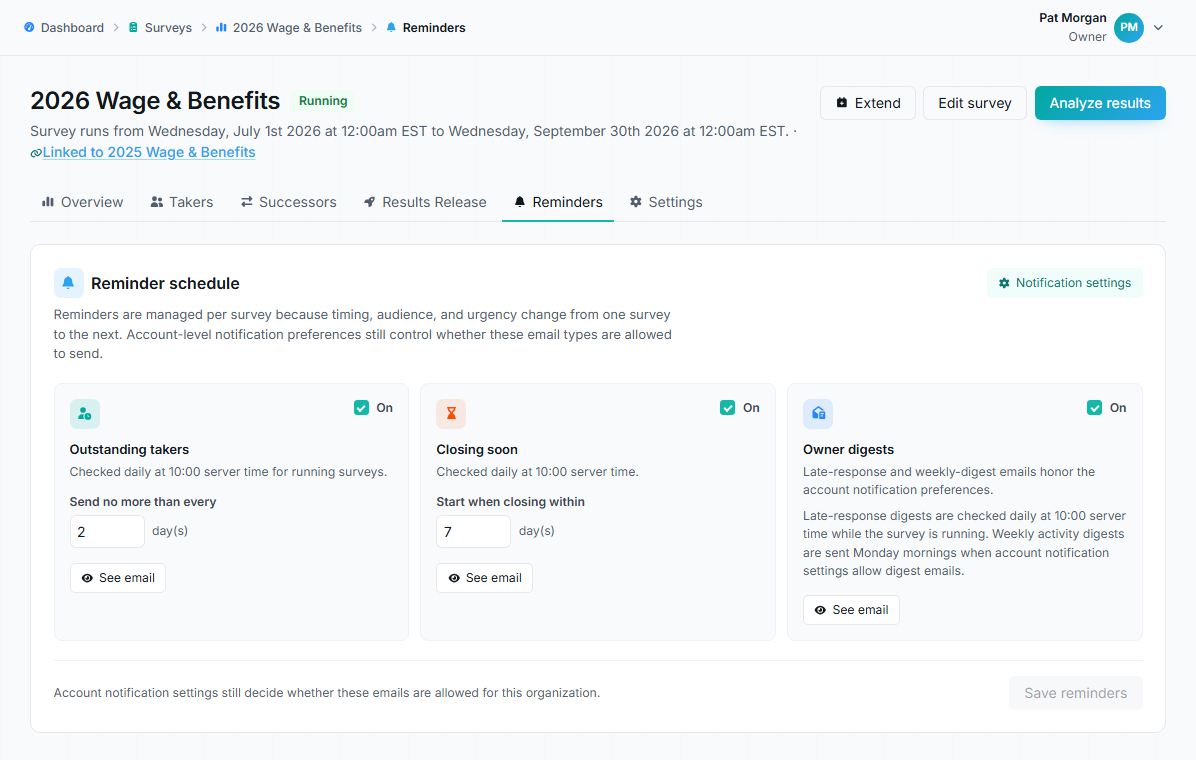
Reminders tab with Outstanding takers, Closing soon, and Owner digests cards.
The three reminder types
Section titled “The three reminder types”Outstanding takers
Section titled “Outstanding takers”Emails takers who have not submitted, asking them to complete the survey. The check runs once a day in the morning while the survey is running. Use “Send no more than every N day(s)” to set the pace: from 1 to 14 days, default every 2 days. No taker is emailed more often than your setting, and submitted takers are never reminded.
Closing soon
Section titled “Closing soon”A stronger nudge as the deadline approaches. Set “Start when closing within N day(s)”: from 1 to 30 days, default 7. When the survey enters that window, outstanding takers get a closing-soon email.
Owner digests
Section titled “Owner digests”Keeps your own team informed: a daily late-response digest while the survey runs, and a weekly activity summary on Monday mornings. These respect the account-level notification preferences.
Each card has an On/Off toggle and a See email button that previews the actual email content. Click Save reminders after changing values. Reminder settings lock once the survey is closed.
Two layers of control
Section titled “Two layers of control”A reminder email only sends if both are true:
- The reminder type is enabled on the survey’s Reminders tab.
- The account’s notification settings allow that email type for the organization (see General settings and notifications).
The footer of the Reminders tab notes this: account notification settings still decide whether these emails are allowed.
Manual follow-up
Section titled “Manual follow-up”Automatic reminders handle the routine cadence. For targeted outreach, use Resend invite on individual takers (or in bulk) from the survey’s Takers tab; it re-sends the invitation email with the survey link. Resend is disabled for takers who already submitted.
Invite-by-link surveys
Section titled “Invite-by-link surveys”If the survey uses invite-by-link mode (adding an invitee records them but sends no email, because you share the link yourself), automatic emails are not part of the flow, so plan your own follow-up channel.
Troubleshooting
Section titled “Troubleshooting”Takers say they get no reminders
Section titled “Takers say they get no reminders”Check, in order: the reminder type is On for this survey; the account notification settings allow it; the taker hasn’t already submitted; and the taker’s email hasn’t bounced (look for an Email issue badge on the Takers tab).
A taker feels spammed
Section titled “A taker feels spammed”Increase the “no more than every N days” spacing, or turn Outstanding takers off and rely on the closing-soon notice only.