

Team members
The Team members page (sidebar, under People) lists everyone with access to your account workspace, as opposed to survey takers, who are the business contacts answering surveys. Only owners can invite, edit, or remove members; managers and viewers see the page read-only.
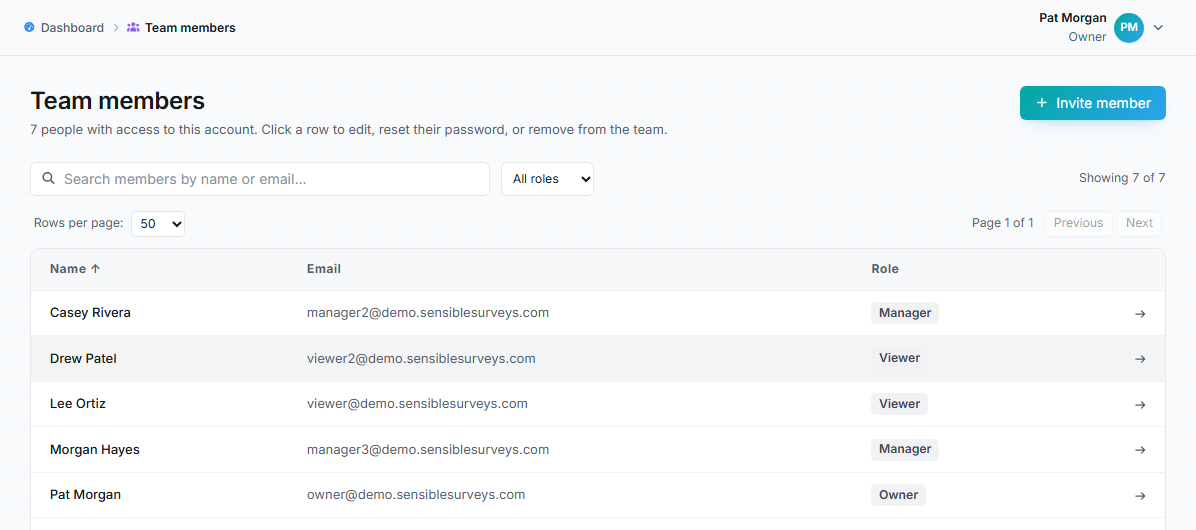
Team members page listing members with roles and an Invite member button.
Inviting a member
Section titled “Inviting a member”Click Invite member and fill in first name, last name, email, and a role:
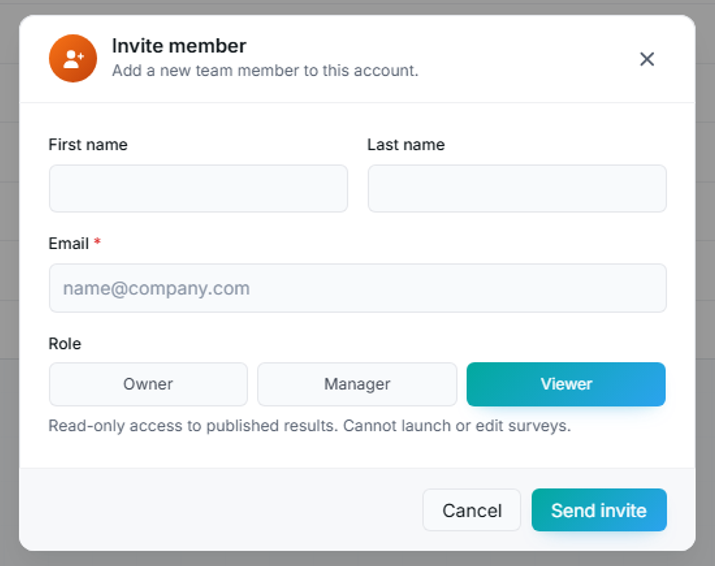
The Invite member dialog with the role choices and their descriptions.
- Owner: full access: manage members, launch surveys, publish results, edit account settings.
- Manager: launch surveys, invite takers, answer on behalf of takers, publish results. Cannot add or remove members.
- Viewer: read-only access to published results. Cannot launch or edit surveys.
Send invite emails them a welcome link to set their password. Use the least powerful role that covers the person’s actual job; you can raise it later.
Editing a member
Section titled “Editing a member”Click a row to open the member. From there you can:
- Update their name or email.
- Change their role: with guardrails: you can’t grant a role higher than your own, can’t modify someone more privileged than you, and can’t change your own role.
- Send password reset email: the link expires after 60 minutes.
- Remove from account.
Removing a member
Section titled “Removing a member”Removal takes effect immediately: they lose access to the account on their next request. If you re-invite the person later, set their role again; previous permissions don’t carry over. The confirmation dialog spells this out before you commit.
Team members vs. survey takers vs. results audiences
Section titled “Team members vs. survey takers vs. results audiences”Three lists that are easy to confuse:
- Team members (this page): people who help run the account.
- Survey takers: business contacts who answer surveys; managed per survey on the Takers tab.
- Viewers added to a survey’s results: result-only access granted per survey via Manage who can see results. The account-level viewer role here is broader: it applies across published results, not one survey.